
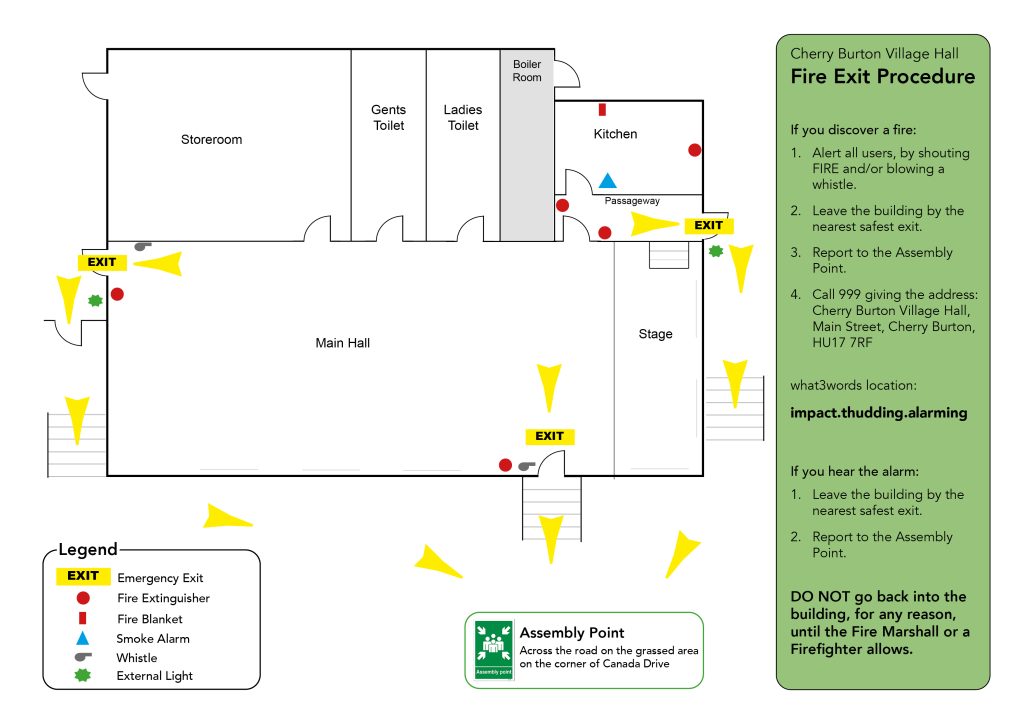
FIRE EXIT PLAN
OPERATING THE SOUND SYSTEM
Mixer and speakers must first be wired up and ready to go.
- Check that the mains plugs for both mixer and bass speaker are connected to the power supply. (Do not turn on Mixer or Speakers yet)
- Check that the red MAIN OUT (Master Volume) knob on the mixer situated on the bottom right hand corner, is at zero.
- Turn on the mixer -push in small white button on the rear.
- If mic required, check that the red channel volume knob is at zero and then plug the lead into CH 1 if not already there.
- Turn on the power to the bass speaker using the toggle switch at the bottom left hand corner, adjacent to the mains input.
- FOR MIC USE:
- Check switch on the mic itself is ON
- Turn red MAIN OUT knob on the mixer approx’ halfway round.
- Turn red Channel 1 Volume knob until the desired volume is reached while speaking into the mic. Try to avoid using the mic directly in front of the speakers otherwise feedback noises can occur. Other mics or instruments can be added in the same way to the other channels 1-6.
- FOR BLUETOOTH USE:
- Locate red BT knob (next to CH 6) and the Pairing button just above it. Push down the Pairing button until it flashes and then link your device etc to ‘Citronic’.
- Turn red MAIN OUT knob on the mixer approx’ halfway round.
- Play music on your device adjusting the red BT volume knob (and then the MAIN OUT knob if needed) until the desired volume is reached.
- Note that the system can also accept memory stick data too.
HOW TO TURN OFF THE SOUND SYSTEM
- Turn down all volume knobs on the mixer to zero (far left).
- Turn OFF the bass speaker first (toggle switch next to plug input).
- Then turn OFF the mixer (white button at rear).
- Unplug mains plugs, and if using Bluetooth, DISCONNECT from device (in device settings).
REMEMBER …
To turn OFF … SPEAKER first, then MIXER
To turn ON … MIXER first then SPEAKER